Multan Electric Power Company
MEPCO Bill Check Online
Enter the 14-digit reference number or 10-digit Consumer ID from any old bill. Your latest MEPCO bill then opens on this page, with the amount, due date and units. This MEPCO bill check is free, and you can download or print the bill.
Updated for this month
Bill checker tool
Recent searches
🔒 Your bill is fetched directly from the official PITC billing server. We keep a temporary copy for up to 24 hours, then delete it.
to see how the viewer looks.
Your MEPCO Bill
Reference: —
How to Check Your MEPCO Bill Online
You need one number from an old bill, and the check takes only a few steps.
- Find the 14-digit reference number or the 10-digit Consumer ID on any old MEPCO bill.
- Choose Reference Number or Consumer ID in the box above.
- Type the digits without spaces, and leave off any U or R letter.
- Tap Check Bill, then tap Download PDF or Print.
The result shows the amount due, the due date, the late amount, your units and the bill month.
Where to Find Your MEPCO Reference Number
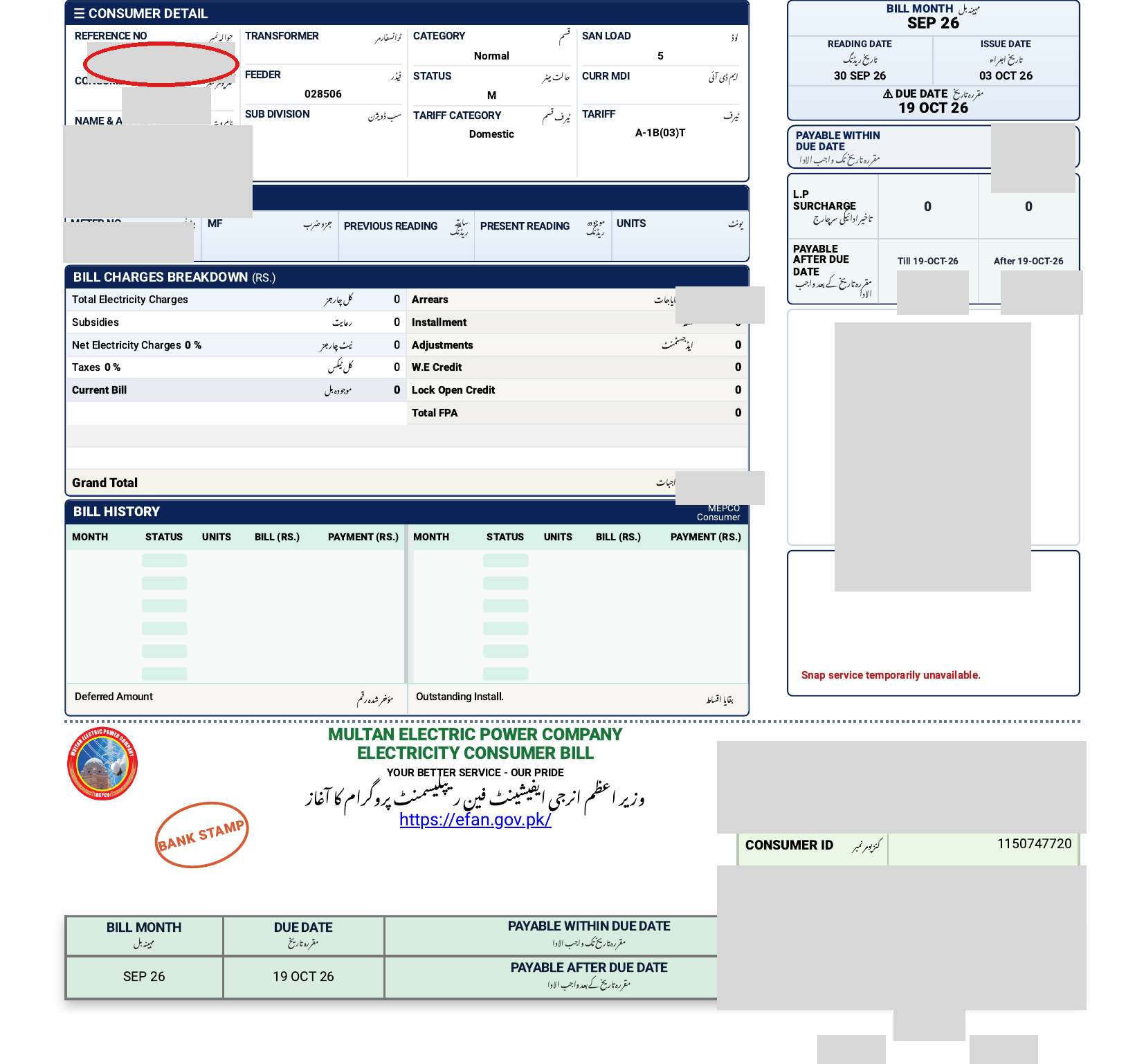
Your reference number is the first line in the Consumer Detail box at the top of every MEPCO bill. It appears in three groups, like 12 34567 1234567. The number stays the same every month, so even last year’s bill works.
| Number | Where you find it | Opens your bill? |
|---|---|---|
| Reference No. (14 digits) | First line of the Consumer Detail box | Yes |
| Consumer ID (10 digits) | Just below the reference number | Yes |
| Meter No. | Meter Info box, and on the meter itself | No |
Both numbers appear again on the bank slip at the bottom of the bill.
What the U or R Letter Means
Many MEPCO bills print a letter after the reference number. U means urban and R means rural. Our box takes digits only, so leave the letter out.
Some sites ask you to enter a new number for 2026. You don’t need one, because the number belongs to your connection, not to the year.
Lost Your Bill?
You can still find your number, so try these steps in order.
- Look for any old bill, even a torn or faded one.
- Open the receipt or saved biller in JazzCash, Easypaisa or your bank app.
- Check for a bill alert SMS, if you registered your mobile number.
- Use the CNIC Registration page on mepco.com.pk to link your CNIC to your connection.
- Visit your sub-division office or Customer Facilitation Centre with your CNIC and a property paper.
Once you find the number, save it in your phone contacts. Next month’s check will then take seconds.
MEPCO Duplicate Bill: Download, Print or Save as PDF
A MEPCO duplicate bill is the same bill as your paper copy. It comes from the same PITC billing record, so the amount, due date and barcode all match. People also call it the MEPCO web bill or e-bill.
PITC stands for Power Information Technology Company. It runs the billing system for MEPCO and the other state-owned power companies.
When You Need a Duplicate Bill
- Your paper bill didn’t arrive, or it came after the due date.
- The bill got lost, torn or wet.
- A landlord, school or bank wants proof of address.
- You want to know the amount before the paper bill comes.
How to Print or Save It
Check your bill in the box above, then tap Download PDF or Print. Print at 100% scale, so the bank can read the barcode. If your phone shows no PDF button, open the browser’s Share menu, tap Print, then choose Save as PDF.
How to Read Your MEPCO Bill
Most people look only at the total. These lines explain why your bill went up or down.
| Part of the bill | What it tells you |
|---|---|
| Name and Address | The name on the connection, which is often a previous owner or landlord |
| Feeder, Sub Division | The line that supplies you and the office that handles your connection |
| Tariff | Your category, for example A-1 for homes, which sets your rates |
| San Load | Your sanctioned load in kW, which sets your fixed charges |
| Previous and Present Reading, MF, Units | The units you used, multiplied by the MF where one applies |
| Meter snapshot | A photo of your meter on reading day |
| Taxes, FPA | Sales tax, any income tax, and the monthly fuel price adjustment |
| Arrears, Installment | Unpaid amounts from earlier bills and any agreed instalment |
| Bill History | Units, bills and payments for the past 12 months |
| Reading Date, Issue Date, Due Date | When MEPCO read the meter, issued the bill and expects payment |
| Payable Within and After Due Date | The two amounts you could pay, with the late surcharge between them |
FPA means fuel price adjustment. NEPRA, the power regulator, decides it every month, and it can add to your bill or reduce it.
Always compare the meter snapshot with your own meter. If the numbers don’t match, you have strong grounds for a complaint.
The 200-Unit Rule Can Cost You Six Months
One heavy month can raise your next six bills, so this rule matters more than any other line. A protected home has used 200 units or less in each of the last six months.
Going over 200 units once moves the home to unprotected rates for six months. Unprotected homes also pay a higher rate on every unit, not just the extra ones.
Here is an example for a protected MEPCO home with a 2 kW load, before FPA and tax. At 199 units, the bill is about Rs 2,942. At 201 units, it jumps to about Rs 7,353.
The cost doesn’t stop there. Five more months at 180 units then cost about Rs 5,804 each, instead of Rs 2,695. Across six bills, that one high month adds about Rs 19,956.
Your bill shows your reading date. Check your meter about ten days before it, and cut back on heavy appliances if you are close to 200. These figures follow NEPRA’s schedule notified as S.R.O. 279(I)/2026, and our electricity slab rates guide lists every slab.
MEPCO Bill Issue Dates and Bill Not Showing
MEPCO reads meters in batches through the month, so homes in one city get bills on different days. On one September 2026 bill we checked, MEPCO read the meter on 30 September. It issued the bill on 3 October, with payment due on 19 October.
Your own due date sits next to the amount payable within the due date. If you need more time, ask for a due date extension or instalments before the date passes. You can apply in the official MEPCO app or at a Customer Facilitation Centre.
| What you see | Likely reason | What to do |
|---|---|---|
| Not found, or an error | A digit is missing or extra, or you typed spaces | Re-enter 14 digits, or 10 for the Consumer ID, with no spaces |
| Not found, though the digits look right | You typed the U or R letter | Re-enter the digits only |
| Last month’s bill | Your batch’s new bill isn’t out yet | Check again in two or three days |
| Page won’t load | The billing server is busy, often near due dates | Wait a while, then try again |
Can You Check a MEPCO Bill by CNIC?
No, a CNIC or a name can’t open a MEPCO bill. Both the PITC bill page and this page find bills only by reference number or Consumer ID.
One CNIC can link to several connections, such as a house, a shop and a tubewell. Many bills also stay in a previous owner’s name. A reference number, in contrast, points to exactly one meter.
Your CNIC still helps in two ways. Your sub-division office can use it to find a lost reference number. You can also link it to your connection on PITC’s MNR portal to get bill alerts by SMS.
Any site that claims a CNIC search is guessing or collecting ID numbers. Keep your CNIC off bill-checking sites, including this one. Our guide to checking a bill by CNIC explains more.
MEPCO Bill Check for Multan and South Punjab
MEPCO supplies electricity across South Punjab. Its 2024-25 annual report lists 8,816,400 consumers in 15 districts on 30 June 2025. About 90% of them are homes. Its head office sits on Khanewal Road, Multan.
The check above works the same everywhere, from Multan city to a village in Rajanpur. There is no separate portal for each city.
| Covers | Names |
|---|---|
| Districts | Multan, Khanewal, Sahiwal, Pakpattan, Vehari, Bahawalnagar, Bahawalpur, Rahim Yar Khan, Lodhran, Muzaffargarh, Kot Addu, Dera Ghazi Khan, Taunsa, Rajanpur and Layyah |
| Operation circles | Multan, Khanewal, Sahiwal, Vehari, Bahawalnagar, Bahawalpur, Rahim Yar Khan, Muzaffargarh and Dera Ghazi Khan |
Your bill shows your circle and sub-division, so quote them in any complaint. If your town isn’t listed, another company bills you. Try LESCO bill check for Lahore or FESCO bill check for Faisalabad. For Gujranwala, use GEPCO bill check.
How to Pay Your MEPCO Bill
Every payment method needs only your 14-digit reference number.
| Method | How it works |
|---|---|
| JazzCash or Easypaisa | Open Bill Payment, choose Electricity, then MEPCO, and enter the number |
| Bank app | Open utility bills, choose MEPCO, and pay with the number |
| Bank branch | Pay at the counter with the paper or printed duplicate bill |
| Wallet agent shop | Pay in cash at a JazzCash or Easypaisa shop, and keep the receipt |
Before you pay, match the amount in the app with your bill. If they differ, the app may show the amount after the due date. Keep your receipt, because the payment shows only on your next bill. Our guide to paying electricity bills online covers more options.
MEPCO Helpline and Complaints
Call 118 first for a power fault or a wrong bill. It’s the free national electricity helpline, and it passes your complaint to MEPCO with a complaint number.
| Channel | Use it for |
|---|---|
| 118 (free call) | Outages, faults and billing complaints |
| ccms.pitc.com.pk | Registering and tracking a complaint online |
| Official MEPCO app | Due date extension, instalments, meter change and tenant details |
| Electricity Shutdown page on mepco.com.pk | Planned power cuts in your area |
| Customer Facilitation Centres | Help in person at MEPCO offices |
| NEPRA complaint portal | Taking an unsolved complaint to the regulator |
If you think your bill is wrong, check these things before you call.
- Compare the meter snapshot on your bill with your meter.
- Compare this month’s units with your 12-month history.
- Check whether you moved from protected to unprotected rates.
- Then complain through 118, and keep the complaint number.
Our electricity complaint guide explains each step in more detail.
What This Site Can and Can’t Do
BillChecker shows your latest MEPCO bill from the PITC billing system, so you can read, save or print it. We can’t change a bill, take a payment, register a complaint or restore your power. Only MEPCO and its offices can do those things.
We keep a copy of your bill for up to 24 hours to load it faster, then delete it. Your browser remembers the numbers you check, so your next check takes one tap.
میپکو بل آن لائن چیک کرنے کا طریقہ
- کسی بھی پرانے بل پر 14 ہندسوں کا ریفرنس نمبر یا 10 ہندسوں کا کنزیومر آئی ڈی تلاش کریں۔ یہ نمبر ہر مہینے ایک ہی رہتا ہے۔
- اوپر والے خانے میں نمبر بغیر وقفوں کے لکھیں۔
- اگر نمبر کے بعد U یا R لکھا ہو تو اسے چھوڑ دیں، صرف ہندسے لکھیں۔
- "Check Bill" دبائیں، پھر بل ڈاؤن لوڈ یا پرنٹ کریں۔
شناختی کارڈ سے بل: شناختی کارڈ نمبر سے بل چیک نہیں ہوتا۔ جو ویب سائٹ ایسا دعویٰ کرے، اس پر اپنا شناختی کارڈ نمبر درج نہ کریں۔
200 یونٹ کا خیال رکھیں: پروٹیکٹڈ گھر کسی ایک مہینے میں بھی 200 سے زیادہ یونٹ استعمال کرے تو اگلے چھ مہینے زیادہ ریٹ پر بل آتا ہے۔
شکایت: بجلی کی خرابی یا غلط بل کے لیے 118 پر مفت کال کریں۔
MEPCO Bill FAQs
How can I see an old MEPCO bill, like one from May?
You can’t open an old bill online, because the system shows only the current one. Every bill has a 12-month history table with units, amounts and payments. So May appears on any bill from the next year. For a full copy of an older bill, ask your sub-division office or a Customer Facilitation Centre.
Is the online MEPCO bill valid for payment?
Yes, banks and wallets accept it. The online copy has the same reference number, amount, due date and bank barcode as your paper bill. JazzCash, Easypaisa and bank apps need only the reference number, so you can pay without printing. Print at full scale if a bank counter asks for paper.
Does MEPCO have an official app?
Yes, MEPCO offers its own mobile app, which it links from mepco.com.pk. The app lets you check your bill, ask for a due date extension and request instalments. It also handles meter change requests and tenant details. Be careful with other apps that use the MEPCO name, because they are unofficial.
What is MEPCO MIS?
MEPCO MIS is an internal system that MEPCO staff use. You don’t need it to check your bill. Use the box at the top of this page or the official PITC bill page instead. Both need only your 14-digit reference number or your 10-digit Consumer ID.
How do I know if my MEPCO bill is paid?
Your bank or wallet receipt proves payment until the next bill arrives. On that next bill, the payment appears in the 12-month history table. Any unpaid amount shows under Arrears instead. If a payment you made doesn’t show, take your receipt to your sub-division office.
Why did my MEPCO bill jump this month?
Three things usually cause it. You may have used more units, or the monthly FPA may have gone up. You may also have crossed 200 units and lost protected status. Compare this month’s units with your bill history, then read the 200-unit section above.
Is a WAPDA bill the same as a MEPCO bill?
Yes, across South Punjab. MEPCO grew out of WAPDA’s Multan Area Electricity Board, so many people still call it a WAPDA bill. The bill, the reference number and this check all stay the same. You can use this page whichever name your family uses.
Is this the official MEPCO website?
No, BillChecker is an independent website. It isn’t part of MEPCO, PITC, NEPRA, WAPDA or the Government of Pakistan. We show your bill from the PITC billing system and never change it. MEPCO’s own website is mepco.com.pk, and the official bill page is bill.pitc.com.pk/mepcobill.
Keep your reference number handy, and do your MEPCO bill check here before every due date.
Sources
Disclaimer: BillChecker.com.pk is an independent website. It isn’t part of MEPCO, PITC, NEPRA, WAPDA or the Government of Pakistan. Bills come from the PITC billing system. We last checked the facts on this page in November 2026. If you spot something out of date, please contact us.